Before & after
Your schedule.
Your data.
Getting your breakdown out of Movie Magic for call sheets and reports used to mean hours of copy and paste. Now it’s a spreadsheet you can edit, share, and import.
Before
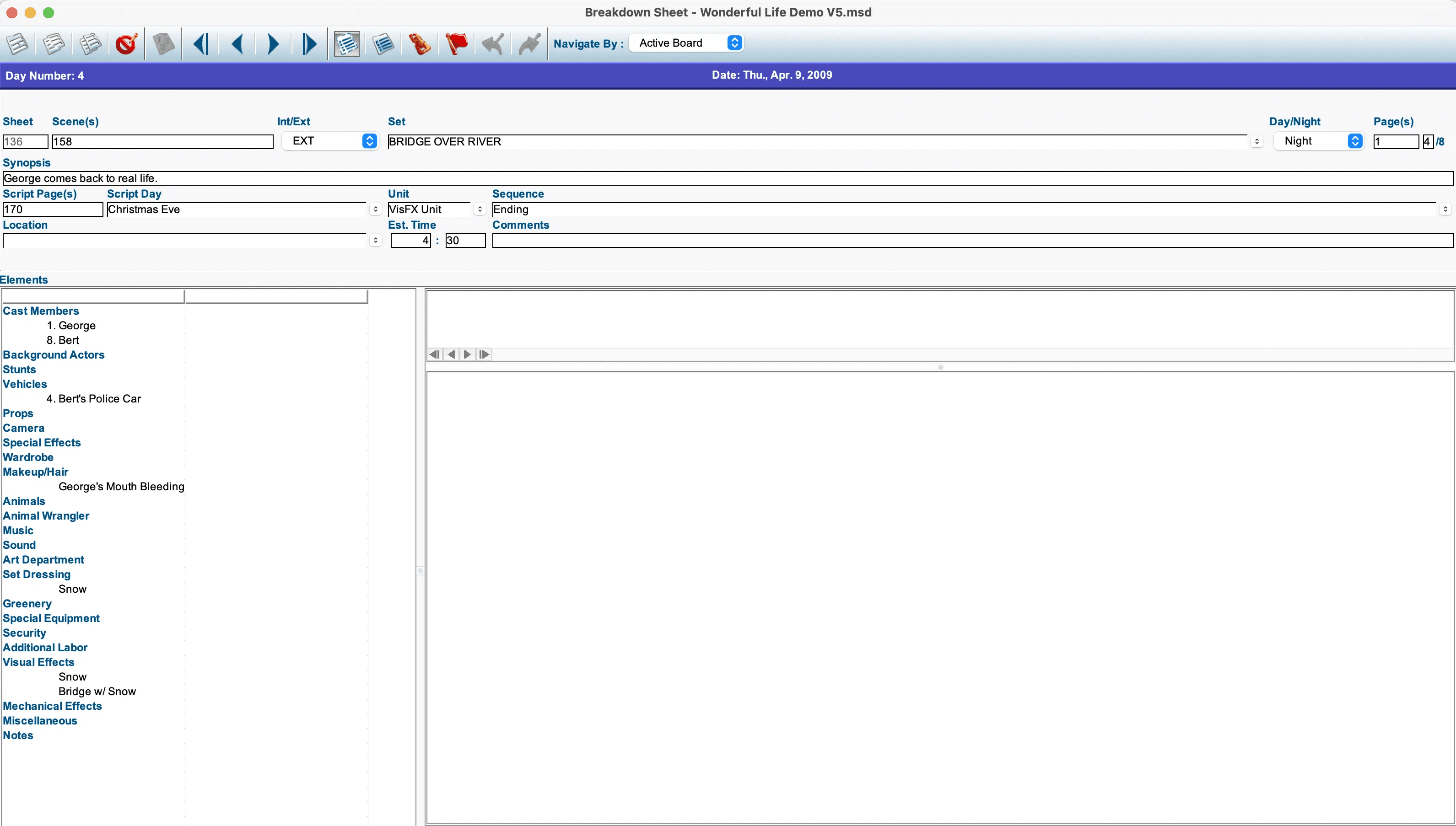
Movie Magic Scheduling
Your scene breakdown and schedule data is locked in Movie Magic, making it difficult to use on call sheets, reports, or in other software.
After
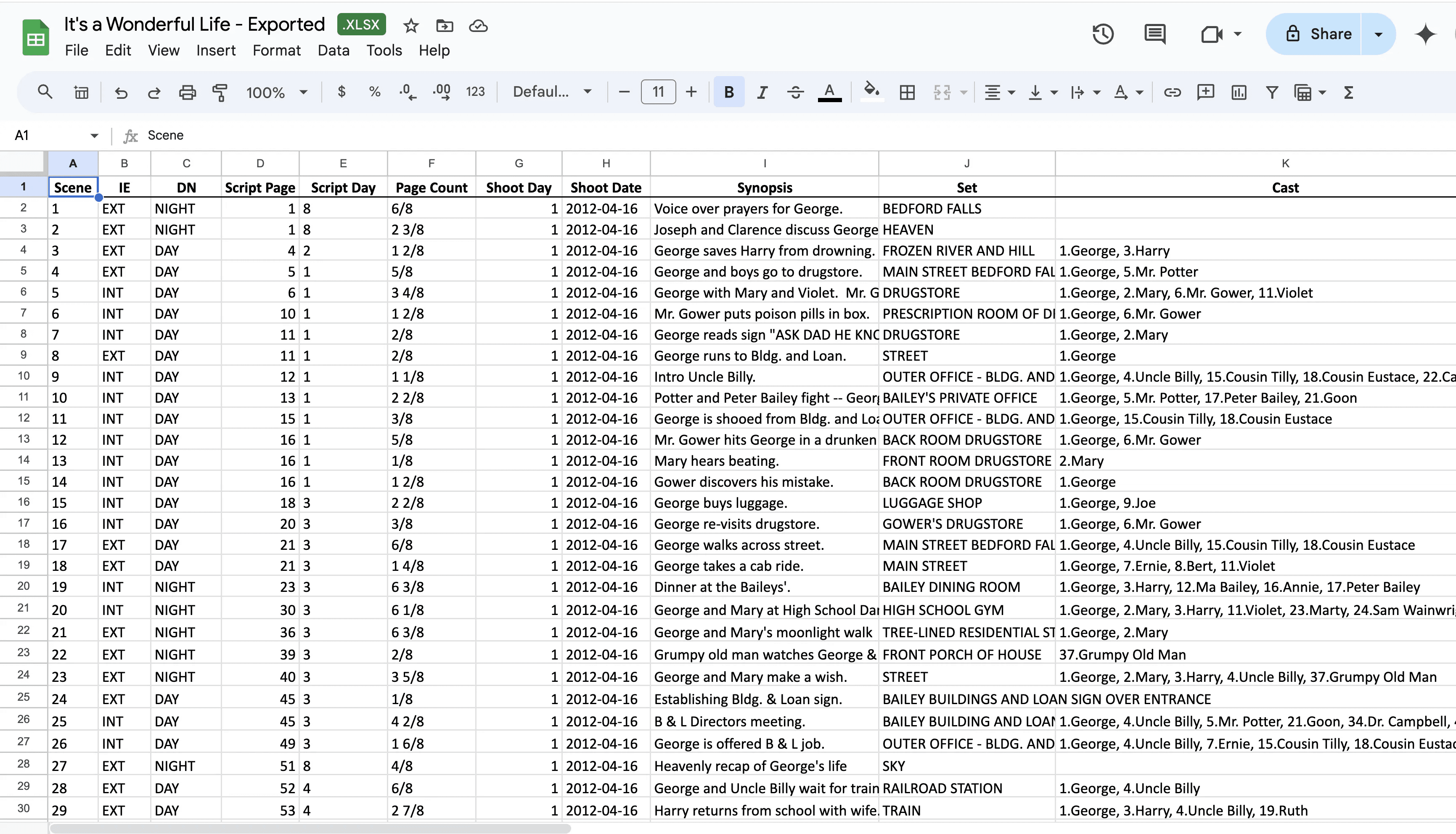
Excel export
Your data is now an Excel file and a JSON file you can edit, share, and import into other tools.
Movie Magic Scheduling
Your scene breakdown and schedule data is locked in Movie Magic, making it difficult to use on call sheets, reports, or in other software.
Excel export
Your data is now an Excel file and a JSON file you can edit, share, and import into other tools.
How it works
Export your MMS data to Excel
in just a few minutes.
Three steps from Movie Magic Scheduling to a clean spreadsheet.
Export from Movie Magic
Save your breakdown as a PDF with our report template.
Upload the PDF
Drop the PDF into the exporter and start the conversion.
Download spreadsheet
Get an Excel file to edit, plus a JSON file for other tools.
A Movie Magic PDF is dragged into the SetHero MMS Exporter, which converts it into an Excel file and a JSON file. The sample files are linked below.
Why productions choose us
Built for the breakdown.
Fast
Drop your PDF in, get your spreadsheet out. Stop retyping scene numbers, sets, and cast IDs one cell at a time.
Accurate
Cast, sets, shoot days, and tagged elements land in the right columns, without the typos that come with retyping.
No learning curve
Import our report template into Movie Magic once. Every export after that is three steps: print, upload, download.
Excel and JSON
An Excel file to edit and send to your crew, plus a JSON file ready to import into production tools like Cinapse.
Built for Movie Magic
Not a generic PDF converter. It’s made for one job: reading Movie Magic breakdown sheets and turning them into rows.
Help from our team
Hit a snag with an export? Email support@sethero.com and a real person on our team will help you sort it out.
The walkthrough
Watch a full export.
Start to finish.
Follow along as a Movie Magic Scheduling breakdown becomes an Excel spreadsheet, step by step.
Integrations
One schedule.
Endless possibilities.
Integrate your Movie Magic Scheduling (MMS) scene breakdowns with other film and TV production software, including seamless imports directly into Cinapse (opens in a new tab).
Got your own scheduling software? Request an integration

Your schedule stays private.
Your schedule is your production’s business. Here’s how we keep it that way.
Processed on our own servers
Your files are converted entirely on our Enterprise servers.
No AI, no black boxes
No AI models or third-party services ever read your schedule.
Deleted after one hour
An hour after conversion, your files are deleted for good. Not even we can get them back.
Trusted by production teams at:







Simple pricing
One export or unlimited.
Your call.
Start with a single export, or go unlimited for a full year.
Single Export
For a one-off project, or to try it out.
$10one-time
- Single MMS export
- Unlimited page count
- Custom columns included
- Download as .xlsx and .json
Unlimited
For schedules that keep changing. Export after every revision, all year.
$35per year
- Unlimited MMS exports
- Unlimited page count
- Custom columns included
- Download as .xlsx and .json
Try it free first. Preview 10 breakdown sheets in Excel before you pay. No account sign-up required.
Try it freeReady to set your schedule free?
Stop copying and pasting. Upload your Movie Magic breakdown and get a spreadsheet you can edit and share.
FAQ
Questions?
Answers.
Need a hand with your export? Our team knows production and is happy to help you get going.
Your full scene breakdown: scene numbers, INT/EXT, day or night, sets, page counts, cast, and every tagged element, plus shoot day and shooting order. It doesn't currently export day out of days, one-liners, or element lists.

Beyond the export
Production tools built to go the distance.
One source of truth for your contacts, call sheets, and reports — a single engine that powers your whole production.